Homework 3: Conditionals and Booleans
Tasks
(20 points) Complete the homework as indicated in the source code.
Download the homework page
Download the source file hw03.py and save it on your computer. It contains the stubs of several Python functions. Save it directly to your folder with your other lab files and open it in the Python environment. Complete the stub methods to perform the indicated function. Verify your code by running the program. Add additional test cases as needed.
In most cases, your function will not print any values. Rather, your function will return values to the calling function and any values will be used there, including possibly printing.
Seek help as soon as you are experiencing difficulty with this assignment.
Do not wait until the deadline to seek help!
Notes
Comparing Characters
Recall that you can compare variables using
<, >, <=, >=, and ==.
The result is based on the type. For example, when text is used, the order is based on the following order:
! " # $ % & ' ( ) * + , - . /
0 1 2 3 4 5 6 7 8 9
: ; < = > ? @
A B C D E F G H I J K L M N O P Q R S T U V W X Y Z
[ \ ] ^ _ `
a b c d e f g h i j k l m n o p q r s t u v w x y z
{ | } ~
where a character that appears before a later is less than the later character. For example,
'!' is less than every other character listed above, while '~' is greater than every other character listed;'9'<'@' and 'a' < '}'.
constrain
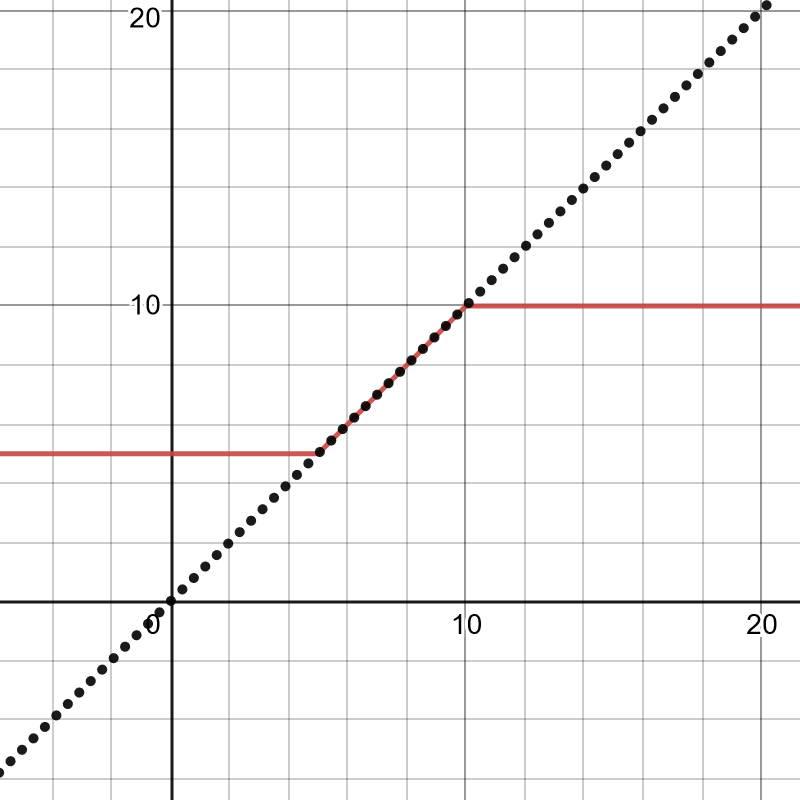
The constrain function limits the upper and lower bounds of a variable. \[ {\rm constrain}(x,a,b) = \begin{cases} a, & \text{if \(x \lt a\)}\\ b, & \text{if \(x \gt a\)}\\ x, & \text{otherwise} \end{cases} \] For example, the graph below shows y = constrain(x,5,10) in red. The graph of \(y = x\) (unconstrained) is show as a dotted line.
inCircle
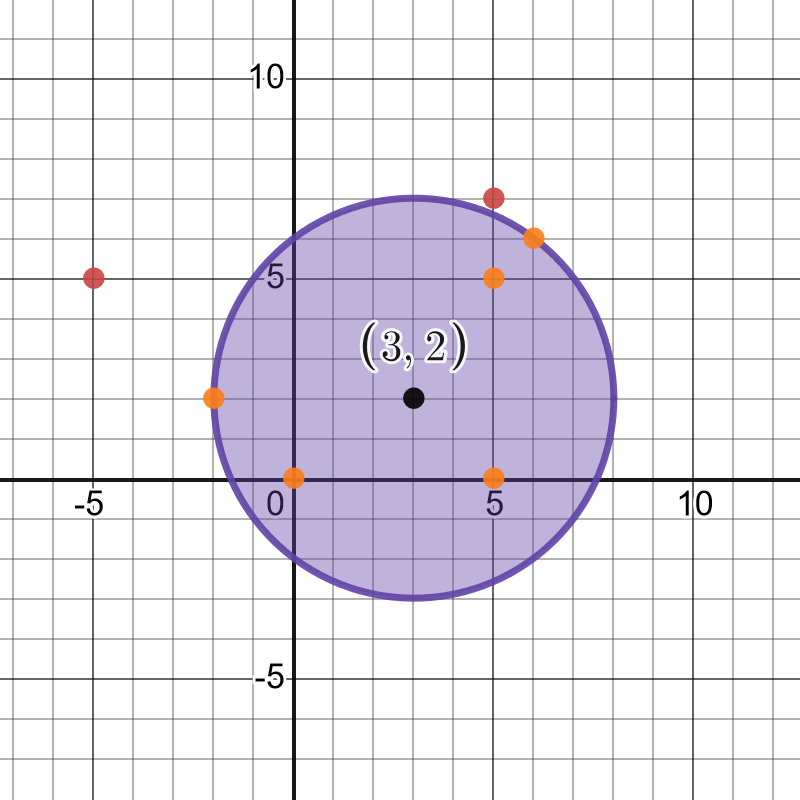
The equation for a circle centered at the point \((a,b)\) with radius \(r\) is given by \[(x-a)^2 + (y-b)^2 = r^2\] which is true when the point \((x,y)\) is on the circle. A point \((x,y)\) is inside a circle if \[(x-a)^2 + (y-b)^2 \lt r^2\] and outside the circle if \[(x-a)^2 + (y-b)^2 \gt r^2.\] For example, a circle centered at the point (3,2) with radius 5 is shown below. The points (3,2), (0,0), (5,0), and (5,5) are completely inside the circle. The points (6,6) and (-2,2) are on the boundary. the points (5,7) and (-5,5) are completely outside the circle.
Code
# Homework #3
# YOUR NAME AND EMAIL HERE
import math


# returns a constrained value of x
# assume a < b
# x, if x between a and b
# a, if x is less than or equal to a
# b, if x is greater than or equal to b
# don't use any predefined Python functions!
def constrain(x,a,b):
  # your code here
  return -1


# returns the name of the digit:
# Assume 0 <= d <= 9
# 'zero', when d is 0
# ...
# 'nine', when d is 9
# don't use any predefined Python functions!
def digitName(d):
  # your code here
  return -1

# assume n is an integer, do all computations as integers
# returns
# n divided by 2, when n is even
# 3 times n plus 1, when n is even
# don't use any predefined Python functions!
def collatz(n):
  # your code here
  return -1

# return True if the point (x,y) is inside or on the boundary of
# a circle or radius r centered at the point (a,b)
# See lab page for the math
# don't use any predefined Python functions!
def inCircle(x, y, a, b, r):
  # your code here
  return -1

# return True if c is a letter a-z or A-Z
# it is not a letter if c has more than one character
# use the len() function; don't use any other predefined Python functions!
def isLetter(c):
  # your code here
  return -1

# return True if c is a digit 0-9
# it is not a digit if c has more than one character
# use the len() function; don't use any other predefined Python functions!
def isDigit(c):
  # your code here
  return -1


# main function for testing
def main():
    print("Homework #3")

    print("constrain:")
    print(constrain(-10, 1, 100), "should be 1")
    print(constrain(1, 1, 100), "should be 1")
    print(constrain(10, 1, 100), "should be 10")
    print(constrain(100, 1, 100), "should be 100")
    print(constrain(1000, 1, 100), "should be 100")

    print("digitName:")
    print(digitName(0), "should be zero")
    print(digitName(2), "should be two")
    print(digitName(5), "should be five")
    print(digitName(9), "should be nine")

    print("collatz:")
    print(collatz(7), "should be 22")
    print(collatz(22), "should be 11")
    print(collatz(11), "should be 34")
    print(collatz(34), "should be 17")
    print(collatz(17), "should be 52")
    print(collatz(52), "should be 26")
    print(collatz(26), "should be 13")
    print(collatz(13), "should be 40")
    print(collatz(40), "should be 20")
    print(collatz(20), "should be 10")
    print(collatz(10), "should be 5")
    print(collatz(5), "should be 16")
    print(collatz(16), "should be 8")
    print(collatz(8), "should be 4")
    print(collatz(4), "should be 2")
    print(collatz(2), "should be 1")

    print("inCircle:")
    print(inCircle(3,2,3,2,5), "should be True")
    print(inCircle(0,0,3,2,5), "should be True")
    print(inCircle(5,0,3,2,5), "should be True")
    print(inCircle(5,5,3,2,5), "should be True")
    print(inCircle(6,6,3,2,5), "should be True")
    print(inCircle(-2,2,3,2,5), "should be True")
    print(inCircle(5,7,3,2,5), "should be False")
    print(inCircle(-5,5,3,2,5), "should be False")

    print("isLetter:")
    print(isLetter('a'), "should be True")
    print(isLetter('A'), "should be True")
    print(isLetter('z'), "should be True")
    print(isLetter('Z'), "should be True")
    print(isLetter('1'), "should be False")
    print(isLetter(' '), "should be False")
    print(isLetter(' '), "should be False")
    print(isLetter('^'), "should be False")
    print(isLetter('~'), "should be False")
    print(isLetter('computer'), "should be False")

    print("isDigit:")
    print(isDigit('0'), "should be True")
    print(isDigit('1'), "should be True")
    print(isDigit('2'), "should be True")
    print(isDigit('...'), "should be False")
    print(isDigit('9'), "should be True")
    print(isDigit('10'), "should be False")
    print(isDigit('A'), "should be False")
    print(isDigit('z'), "should be False")
    print(isDigit('~'), "should be False")


# call the main function
main()
Deliverables
Send me ([email protected]) your Python .py file as an attachment to an
email message with Homework 3 as the subject line.